Employment certificate, work certificate and employment contract
Documentation · Management system
Produce as PDF an employee's certificate of employment, work certificate or employment contract, signed by the managing director or the line manager.
1. Open the window
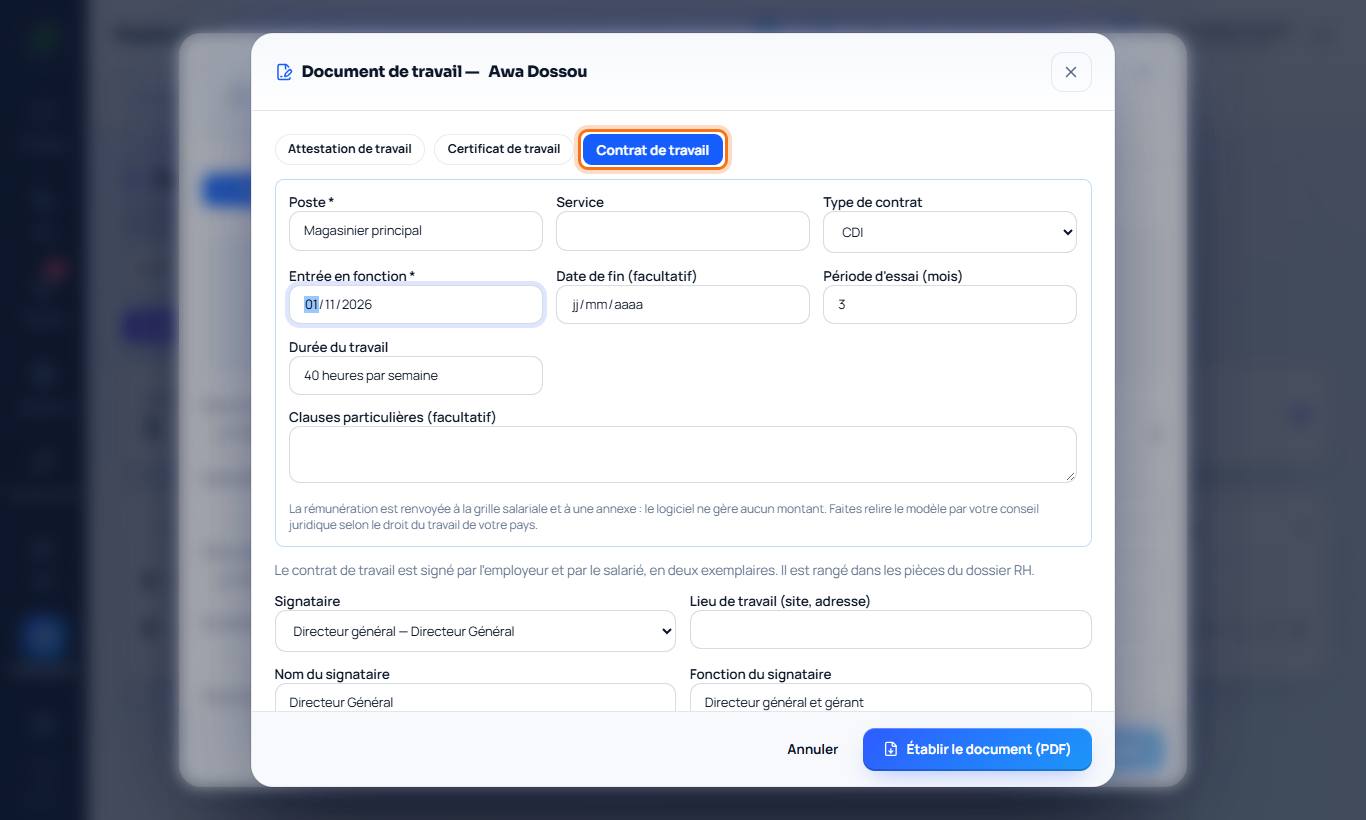
Employee's HR record › Certificate, contract. Choose the document: certificate of employment (the employee works for the company), work certificate (at the end of the contract; the leaving date must be filled in) or employment contract.
2. Signatory
The managing director (Settings › Company) or the employee's line manager is suggested. You can also enter another person and their position.
3. Employment contract
Position, department, contract type (permanent, fixed-term, internship…), start date, end date (mandatory for a fixed-term contract) and reason, probation period, working hours, specific clauses. The contract contains the usual articles and the signatures of employer and employee. Pay refers to the salary scale and an appendix: the software does not handle any amount.
4. Produce the document
Produce the document (PDF): the preview matches the PDF. The document is recorded in the file (reference, date, signatory) and the contract is stored in Attachments. Print it for handwritten signature and stamp.
Good to know
- Have the templates reviewed by your legal adviser according to your country's labour law.